Blog

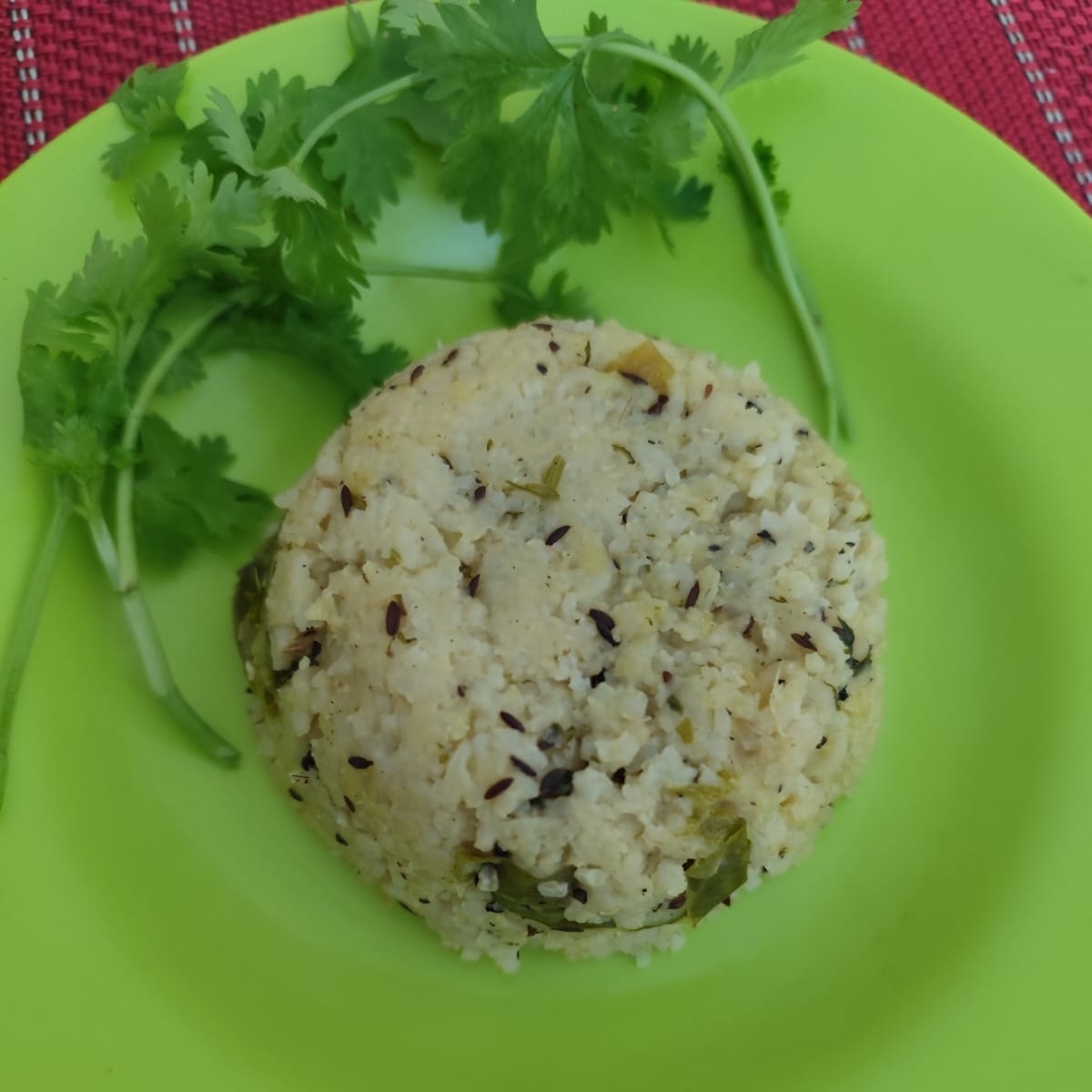
  • Onion poha

    Onion poha

    Ingredients

    1. Poha: 150 gms
    2. Oil: 2tbsp
    3. Onion: 2 big chopped
    4. Mustard seeds: 0.5 tsp
    5. Hing: 1 pinch
    6. Haldi: 0.5 tsp
    7. Jeera: 0.5 tsp
    8. Green chilli: 1
    9. Curry leaves: 10 leaves
    10. Lemon juice: from half lemon
    11. Ground nut: 2 tbsp
    12. Coconut powder: 2 tbsp
    13. Coriander leaves
    14. Salt
    15. Sugar

    Procedure

    1. Wash poha properly and add  1.5tsp each of salt and sugar and keep it aside
    2. Heat oil and fry groundnuts
    3. Using the same oil heat mustard till it splutters.
    4. Then add jeera,  curry leaves, hing.
    5. Fry onion it becomes glassy
    6. Add a pinch of Haldi and fry a bit more
    7. Mix the poha and ground nut.
    8. Cover the pan and leave for 30 seconds
    9. Open and garnish with coriander, dry coconut and squirt lemon juice
  • Rasam

    Rasam

    Cooking time: 15 mins

    Serves: 2

    Ingredients

    1. Tamarind: Gooseberry size
    2. Rasam powder: 1tsp
    3. Tomato: 1 big size
    4. Green chilli: Long slitted
    5. Hing: 1 pinch
    6. Toor Dal powder: 2tsp
    7. Garlic: 4 cloves
    8. Curry leaves: 10 leaves
    9. Coriander leaves
    10. Salt
    11. Sugar: 0.5 tsp

    Procedure

    1. Soak tamarind in water for 15 mins
    2. Take the following in a bowl
      • Crushed tomato by hand
      • Slitted green chilli
      • Rip curry leaves and coriander leaves
      • Crushed garlic
      • Add all other ingredients mentioned above except tamarind
    3. Add half litre water
    4. Add tamarind juice and adjust the sourness as per your liking
    5. Boil the broth for 5 minutes

  • Scrambled Eggs

    Scrambled Eggs

    Cooking Time: 15 mins

    Ingredients

    1. Oil: 3 tbsp
    2. Eggs: 4 beaten
    3. Big Onion: 1 Big Size
    4. Tomato: 1 Medium Size
    5. Ginger Garlic Paste: 1tsp
    6. Turmeric: 1tsp
    7. Chilli powder: 0.5 to 1 tsp
    8. Jeera Powder: 0.5 tsp
    9. Coriander powder: 0 tsp
    10. Salt: to taste
    11. Coriander leaves (Optional)

    Procedure

    1. Heat oil and then fry onion till golden
    2. Add ginger garlic paste and fry till raw smell goes away
    3. Add cut tomato and stir for sometime
    4. Add salt to taste
    5. Add turmeric, chilli powder and jeera powder and fry a little longer
    6. Wait till it is cooked properly and then add the beaten eggs. Keep stirring until it dries.
    7. Garnish with coriander
  • Potato Fry

    Potato Fry

    Ingredients

    1. Oil (Sunflower / Mustard): 3 tbsp oil
    2. Potato: 4 medium size potato peeled and Julienne cut
    3. Onion: 1 medium size sliced
    4. Salt: to taste
    5. Turmeric: 1 tsp
    6. Chilli powder: .5 or 1 tsp
    7. Coriander leaves (optional)

    Procedure

    1. Heat oil in a pan
      • If you are using mustard oil then heat till the bubbles clear out. Otherwise it will taste bad
    2. Fry onion till brownish
    3. Lower the flame and add turmeric
    4. Add cut potatoes and fry
      • Open fry without covering for 5 mins
      • Lower the flame and cover it
      • Stir it occasionally and keep checking till the potato becomes soft
    5. Garnish with coriander after switching the gas off (optional)
  • Tawa Tandoori Chicken

    Tawa Tandoori Chicken

    Time to cook: 45 mins

    Ingredients

    1. Chicken: 200gm
    2. Lemon: 1
    3. Salt: to taste
    4. Curd: 100ml
    5. Mustard oil: 4 tbs
    6. Ginger garlic paste: 2 tsp
    7. Kasuri methi: 1 tsp
    8. Chilli powder: 1tbs

    Procedure

    Marinate for 30 min

    1. Marinate for 30 minutes

    1. Chicken
    2. Salt
    3. Ginger garlic paste
    4. Lemon juice: 1 tbs

    2. Prepare a mix of the following

    1. Mustard oil
    2. Chilli powder
    3. Curd
    4. Salt
    5. Lemon juice: 1tbs
    6. Kasuri methi

    3. Lightly squeeze the marinated chicken to remove any liquid and dip in the mix.

    4. Fry in pan

  • USBPICPROG Hardware Ready..

    I finally got the things that I ordered for from the online shop last week. They took nearly 10 days to deliver the product. I have received all the items except there was one drill bit less. Guess they missed out on that. Rest of the things were in proper quantity. I would not mind it so much for in an order of Rs.1300, 10 bugs don’t matter much. But I would surely mind if the components fail.

    Last week as I was waiting for the hardware I read through the Zigbee protocol. I have read the PHY and the MAC layer. Some more is left to understand so I will blog about it next time. For now lemme blog about todays activity.

    The day started off with a decision to finish and test the hardware. So before getting on to the actual work I decided to check the board ones properly for any disconnected routes and missing drills. I found a few missing drills and completed it. Then I spend the next 5 hrs soldering it. I was doing it very slow because I kept checking the components often for correctness. I did not want to do a mistake and remove a soldered component. Doing so inevitably spoils the board. After meticulously checking for errors I finished soldering. Though one difference I find is in the capacitors. I have put ceramic instead of a type of capacitor that the board design has. I don’t know what type it is. The BOM generated by KiCad calls it Cuni Package but I did not get much information on the Internet. This capacitor has 3 legs. I hope it makes no difference with the replacement.

    Now I wanted to test the board and here came the road block. As the usbpicprog runs on a pic IĀ  had to program it first inorder to check the board. So I planned to find a computer with a serial port and use the programmer that I had built earlier for serial ports. And this was more difficult than I thought. I could not find a PC with Serial port. This showed me what obsolescence means in electronics. What was such a common thing earlier isn’t available anymore. Anyways I have some workstations in my lab which have serial port so I will use it tomorrow and check it. I just hope that it doesn’t give me any adventures and it works in one go.

    So till then fingers crossed.

  • USBPICPROG Firmware Loading and programming

    In the previous blog I had mentioned that I had completed the hardware but I was not able to test the hardware. I had to load the bootloader into the controller. I tried doing it with my serial programmer but for some reason it did not work. Luckily I had given another Ic to my friend who got it programmed for me. I plugged that IC in the hardware and the board worked like a charm.

    Upon connecting the jumpers as specified by the USBPICPROG website and connecting the USB to the USBPICPROG hardware with the software opened resulting in some LEDs flashing. At the bottom of the software Bootloader v.1.0. connected appears. I then loaded the Firmware-0.5.0.hex into the software and clicked on programming. In about 7 secs the PIC got programmed with the bootloader.

    I removed the USB and connected the other jumper also. I reinserted the USB and started the software again and I was greeted with Your firmware is too old. Latest is 1.0.0. Consider upgrading? This being the first time that I was using this hardware I was too scared to try anything new. I was excited to use the hardware atleast once before trying anything new. So I ignored the update.

    I connected another controller on a bread board and connected the necessary pins required for ICSP. I connected it to the hardware and tried autodetect hardware and to my surprise without any more problems it detected the PIC. I could then go ahead and program the PIC. I tried programming few other PICs also and it worked just fine.

    After several use of the software the update request had started annoying me and I decided to update the firmware to the latest. I selected ok and it took me to /usr/share/usbpicprog. There was a firmware hex file which had already been downloaded without my knowledge. I selected it. Both the jumpers where still connected as against the advice from the website. The websites requires that one of the jumpers be removed to enter the bootloader mode before upgrading the firmware. On selecting the hex file it automatically started programming. On restarting the software I got a nice shock. The software said Bootloader or firmware not detected!!!

    That message scared me and I thought I was done with the firmware I need to reload the bootloader. Just as a desperate measure I removed one of the jumper and reconnected the hardware. And the hardware booted in the Bootloader mode!!! PHEW!!! I felt relieved and I loaded the older firmware. I was pretty confident now that the bootloader remains safe and can be used for rescue always. On restarting it detected the old firmware and again gave an option to upgrade. This time I noticed that the I had forgotten to remove the ICSP connected to the other PIC. I removed the ICSP pins but still kept both the jumpers connected. On selecting the new firmware like the last time it got programmed correctly this time. And reinserting the usb showed the latest firmware version at the bottom of the software.

    So I am finally set with the latest firmware and a working usbpicprog hardware.